01
Embedded runtime
Agent + LM Studio backend in one process. No server to babysit — `caprigo` is the product.
CLI harness
LM StudioCaprigo embeds the agent against LM Studio — multi-pane HUD, HOME missions, desktop body, and tool loops that finish work on your machine. No gateway. No browser dashboard required.
Why Caprigo
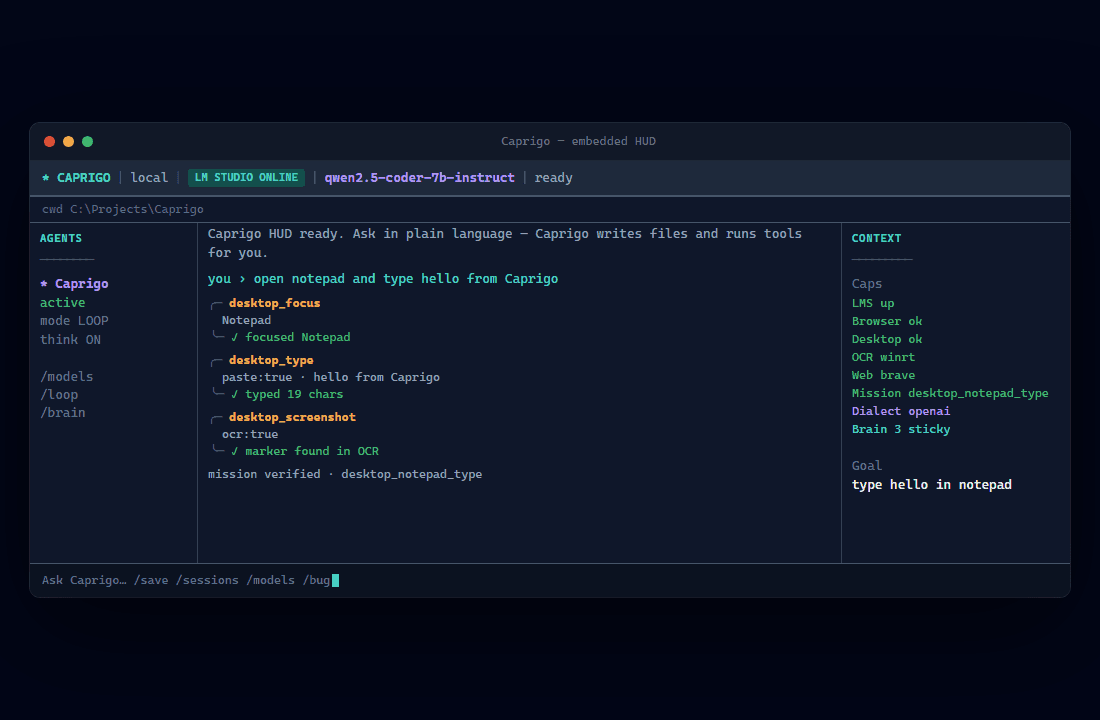
Most AI products hide execution behind a message bubble. Caprigo shows every tool call, cap status, and mission verification in a terminal HUD built for operators.
01
Agent + LM Studio backend in one process. No server to babysit — `caprigo` is the product.
02
Harness-owned playbooks bootstrap before the first model turn and auto-drain when models ignore tools.
03
Agents, live session log with tool cards, Context caps, and double-Enter STEER input.
04
Windows desktop_*, WinRT OCR, Playwright browser, shell execution — real tools on your machine.
05
Sticky lessons, failure recovery, and model dialect profiles so tool loops keep moving.
06
Your model, your files, your permissions. Optional Vibes marketplace imports when you want them.
Missions
The harness compiles intent into playbooks — notepad type, web answer, write file — and executes bootstrap steps before the first LLM reply.
Desktop
Harness compiles intent, runs desktop_focus → type → screenshot/OCR, verifies without waiting on the model.
Web
web_search + web_fetch with live tool cards while the harness keeps the turn moving.
Write
write_file with mkdir parents, then browser_open to preview generated HTML.
Install
Windows: setup.ps1 -LaunchHud wraps everything. macOS/Linux: npm install, npm run build, caprigo connect --launch.
Step 01
Node.js 18+. One command on Windows wraps install, build, and guided .env setup.
git clone https://github.com/doteyeso-ops/caprigo
cd caprigo
.\setup.ps1 -LaunchHud
Step 02
Enable Local Server (port 1234) and load a tool-capable model.
# LM Studio → Local Server ON
# Load e.g. qwen2.5-coder-7b-instruct
caprigo connect --launch
Step 03
OpenAI-compatible defaults for the embedded harness.
CAPRIGO_LLM_PROVIDER=openai_compatible
OPENAI_BASE_URL=http://127.0.0.1:1234/v1
DEFAULT_MODEL=qwen2.5-coder-7b-instruct
CAPRIGO_HARNESS_MODE=1
Step 04
Embedded agent runs in-process — no gateway, no browser dashboard.
.\launch-hud.ps1
# or: caprigo tui
caprigo doctorcaprigo doctor, caprigo connect, caprigo setup --interactive, /bug for handoff packsFAQ
No. The default path is the embedded CLI HUD. Agent runs in-process against LM Studio.
Tool-capable models like qwen2.5-coder-7b-instruct. HOME auto-drain helps when models ignore native tools.
The HUD runs on macOS/Linux. Desktop body skills are Windows-first; browser and file tools work cross-platform.
Caprigo is a harness: structured panes, tool cards, mission verification, and operator caps — not a single chat box.